The AI Playbook

Case Study

Running for Office with AI

The documents behind the work.

I'm running for Delaware County Commissioner. Every video, caption, and newsletter in the campaign runs through one AI project built on these context documents. Here they are.

How It Works

What is a project?

Everything on this page runs through one Claude Project. A project is a folder for a single topic. It keeps every conversation about that topic in one place, but the real value is that every conversation in it shares the same context.

Without a project

Every chat starts from zero. You explain your platforms, your posting order, your voice, and the words you never use. Tomorrow you explain it all again.

With a project

The documents are already loaded. Claude reads them every time you ask for something, so it already knows how you write and how you work.

  • One topic, one place

    Every conversation about the campaign lives in the same project, so last week's script is easy to find.

  • Context that stays loaded

    The seven documents below sit in the project full time. Nothing to attach, nothing to paste.

  • Set it up once

    Build the project one time, then use it for every post, script, and newsletter after that.

  • It goes where you go

    The same project works in the desktop app and the mobile app, with the same context in both.

Don't copy and paste these into your own project, unless you also happen to be running for Delaware County Commissioner.

Use them as a model. Put all of them into your own project and ask your AI to build your own brand guide, briefing book, newsletter guide, or social media workflow. Your mix of documents will depend entirely on your business.

From Idea to Feed

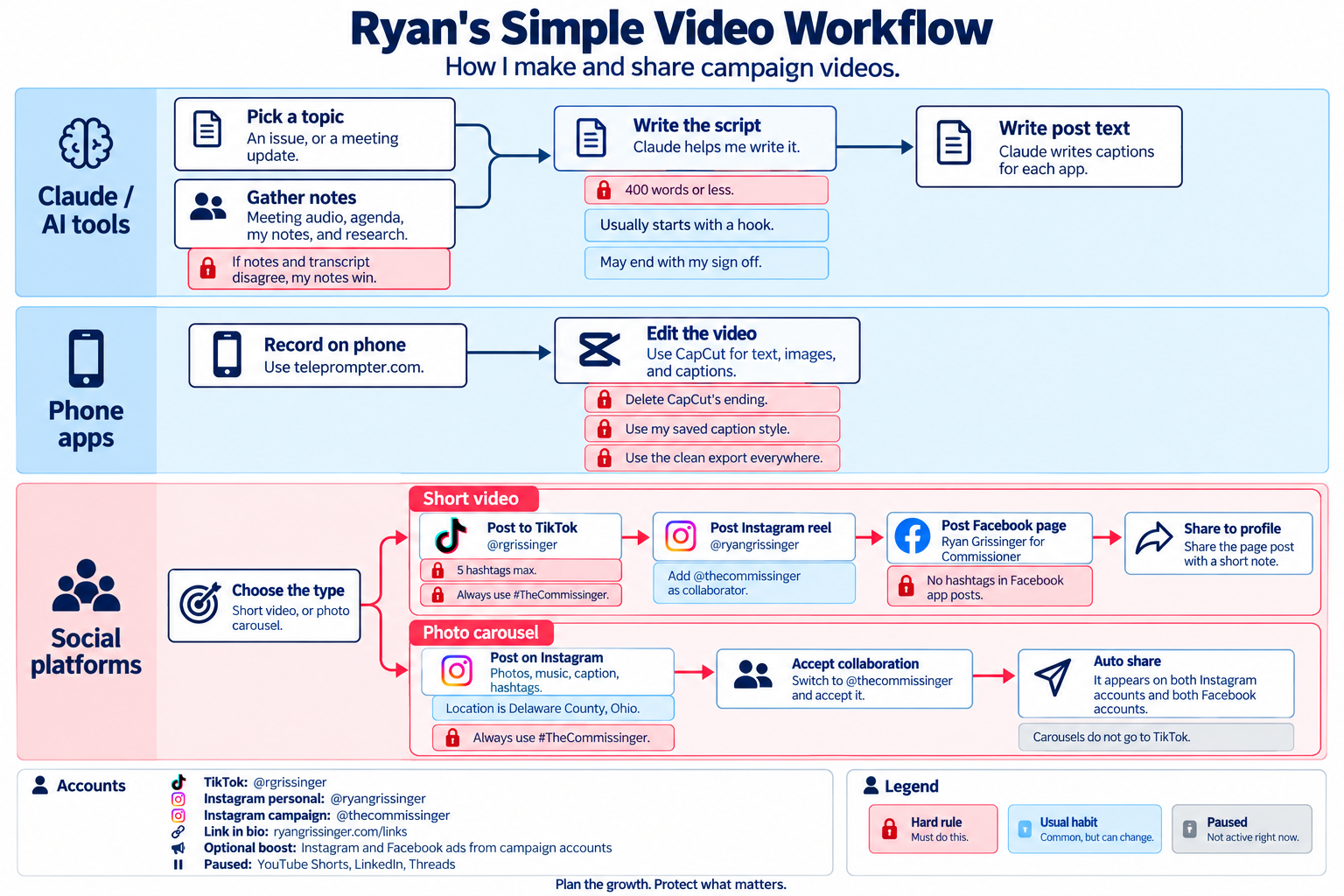
The video workflow from the social media standards document, drawn as one picture. AI does the research, the script, and the platform text. The phone apps handle recording and editing. The red boxes with a lock are rules that never bend, the blue ones are habits I vary, and the gray ones are paused for now.

Ryan's Simple Video Workflow, a flowchart in three lanes. Claude and AI tools: pick a topic or gather notes (if notes and transcript disagree, my notes win), then Claude helps write a script of 400 words or less, then Claude writes post text for each app. Phone apps: record on teleprompter.com, then edit in CapCut, deleting CapCut's ending, using my saved caption style and the clean export everywhere. Social platforms: choose short video or photo carousel. Short videos go to TikTok (5 hashtags max, always #TheCommissinger), then an Instagram reel with the campaign account as collaborator, then the Facebook page with no hashtags, then a share to the personal profile. Photo carousels post on Instagram with the location set to Delaware County, Ohio, the campaign account accepts the collaboration, and it auto-shares to both Instagram and both Facebook accounts; carousels do not go to TikTok. A legend marks hard rules, usual habits, and paused items.
Tap the image to open it full size.

How to Use Them

  1. 1

    Create a project

    In Claude, ChatGPT, or whichever assistant you use, start a new Project (or a custom GPT, or a Gem). That is where your context documents live.

  2. 2

    Put all of these into it

    Download the zip and upload every document. The AI reads them as examples of structure and detail, not as facts about you.

  3. 3

    Ask for your own version

    Use one of the prompts below. Let the AI interview you, then have it draft one document at a time. Save each one back into the project.

Build Your Own Version

Upload the documents to a new project first, then paste this.

I've uploaded a set of context documents from someone else's project. They belong to a political campaign, not my business. Do not copy their content.

Use them only as a model for structure, level of detail, and how the rules are written.

I run [BUSINESS], which [WHAT YOU DO] for [WHO YOU SERVE].

I want my own version of [DOCUMENT: e.g. social media standards / brand voice guide / newsletter guide].

Interview me one question at a time until you have what you need. Then draft the document for my business.

Map My Social Media Workflow

Turn what you already do into written rules an AI can follow.

Using the social media standards document as a model, help me write down how my business actually does social media today.

Ask me about:
1. Which platforms I use, which I've abandoned, and why
2. How a post gets made, from idea to published
3. The rules I never break, and the habits I vary
4. The order I publish in, and what text each platform needs

Separate hard rules (with the reason for each) from defaults. Then draft my standards document.

Write My Voice Guide

Give the AI real samples of your writing so it learns your voice, not a generic one.

Here are [NUMBER] samples of my writing: posts, emails, or transcripts of me talking.

Using the voice constitution document as a model, write a voice guide for me.

Include:
1. Words and phrases I actually use
2. Patterns that would sound wrong coming from me
3. A banned list of generic AI phrases
4. A short self-check the AI should run before giving me any draft

Quote my samples as evidence for each rule.

The Documents

Seven documents. Tap Read It to open any of them right here. The download is a plain-text file you can drop straight into an AI project.

Social Media Standards

Which accounts are active and which are paused, the hard rules versus the defaults, the video production workflow, the title card spec, and the exact order posts go out on each platform.

Model it for: Your own social media workflow: where you post, in what order, and what the AI drafts at each step.

Script Voice Constitution

The rules that keep AI-drafted scripts and captions from sounding like AI: banned phrases, how often a rhetorical device may appear, required specifics, and a self-audit the AI runs before handing anything back.

Model it for: Your own brand voice guide, written as rules an AI can check itself against.

Campaign BrandScript

A filled-in StoryBrand framework on a single page: the hero, the problem, the guide, the plan, the call to action, and the one-liner.

Model it for: Your own messaging foundation. Every post and email should trace back to it.

Newsletter Standards

A weekly email built on the same section spine every issue, a one-ask rule, a pattern for writing asks people act on, and a pre-send checklist.

Model it for: Your own newsletter guide, so every issue follows the same structure no matter who (or what) drafts it.

Project Instructions

The instructions for the AI project itself: which document owns which facts, data integrity rules, and a Mastermind Council of advisors the AI channels when answering.

Model it for: Your own project instructions. Tell the AI where things live instead of repeating them.

Candidate Briefing (redacted)

Who the candidate is, the platform, approved and retired language, and the published issues. Team details and strategy are replaced with placeholders.

Model it for: Your own company briefing: who you are, what you offer, and the words you use and avoid.

Briefing Book (Section 0 only)

The data integrity rules: confidence tags on every fact, trusted sources, and a registry of wrong claims that AI research tools kept reintroducing, including one labeled "verified."

Model it for: Your own fact sheet, with a list of things the AI keeps getting wrong about your business.
What I Redacted, and Why

The working project has eight documents. I left out the full briefing book (about 12,000 words of county research) and an internal to-do list, and I replaced team details, strategy, and anything about other people with placeholders.

Your project files will hold the same kind of material: client names, employee details, pricing, plans. That's what makes them useful to the AI. Before you share one, read every line of it. When in doubt, abstract.

The campaign's published positions are at ryangrissinger.com/issues.

π